
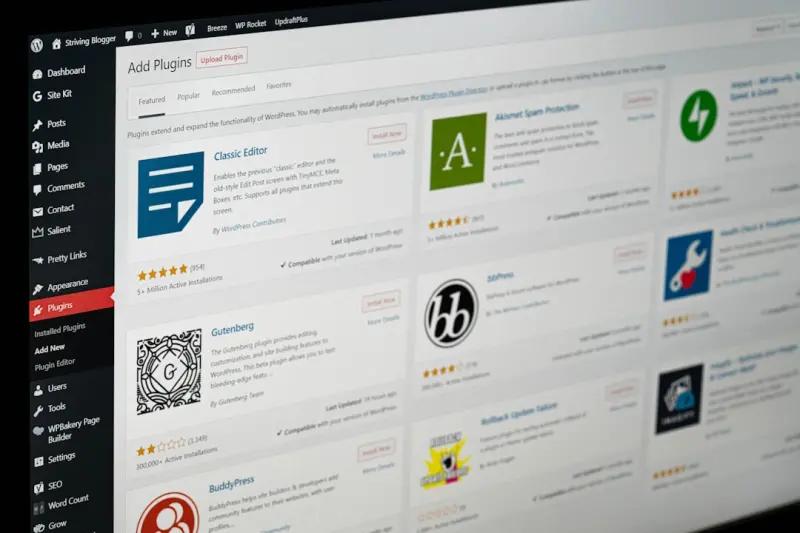
When I first cut my teeth on WordPress, it felt like a blank canvas waiting for a splash of code, a splash of content, and a splash of traffic. Fast‑forward a few releases, and the platform has morphed into a full‑fledged SEO playground—if you know how to read the new rules. In this post I’ll walk you through the most under‑tapped levers in WordPress SEO today: AI‑assisted content blocks, headless architecture, and the next‑generation schema toolkit. These aren’t “nice‑to‑have” tweaks; they’re the competitive edge you need to dominate search results without drowning in endless plugin hunting.
Why the Old Plugin‑First Model Is Crumbling
For years we leaned on a handful of heavy hitters—Yoast, Rank Math, All in One SEO—to cover everything from meta tags to XML sitemaps. The model worked because the core WordPress code was relatively static and the ecosystem could afford a monolithic plugin approach. But three forces are reshaping the landscape:
- Speed expectations. Google’s Core Web Vitals have turned page load time from a nice‑to‑have metric into a ranking signal.
- Content velocity. Teams now churn out hundreds of pages per month, demanding automation that outpaces manual entry.
- Semantic search. Search engines increasingly interpret intent, context, and structured data rather than just keyword density.
When you pile one or two massive SEO plugins onto a site that’s already loading a dozen third‑party scripts, you’re essentially inviting latency, redundancy, and even conflicts. The answer? A leaner, more modular approach that leverages WordPress’s native capabilities while extending them with purpose‑built tools.
AI‑Powered Content Blocks: The New “Keyword”
Imagine a WordPress block that, with a single click, generates a fully optimized section—title, subheadings, internal links, and even schema markup—based on the target keyword you input. That’s no longer fantasy; it’s happening now, thanks to large language models (LLMs) that can be fine‑tuned for SEO tasks.
Here’s how to integrate an AI block into your workflow without compromising quality:
- Choose a reputable LLM plugin. Look for tools that let you set a “tone of voice” and “search intent” parameter. This ensures the output aligns with your brand and the SERP landscape.
- Feed the model your own data. Upload existing top‑performing articles, and let the AI learn your style, preferred length, and linking habits.
- Validate with a human eye. Even the smartest AI can hallucinate facts. Use a quick checklist—facts, citations, and brand guidelines—before publishing.
- Auto‑inject schema. The best AI blocks will append JSON‑LD based on the content type (FAQ, How‑To, Product). This eliminates the manual step of copying schema snippets.
By turning content creation into a semi‑automated process, you free up editorial bandwidth for strategic work—like outreach, data analysis, or deep‑dive thought pieces—while still ensuring each page meets SEO best practices.
Headless WordPress: Decoupling for Speed and Flexibility
Headless architecture separates the front‑end presentation layer from the WordPress back‑end (the “head”). Instead of rendering HTML on the server, you serve content via the REST API or GraphQL to a JavaScript framework like Next.js or Astro. The benefits for SEO are immediate:
- Lightning‑fast rendering. Static site generation (SSG) pre‑builds pages at deploy time, delivering HTML instantly to browsers and crawlers.
- Fine‑grained control over markup. You can craft lean, semantic HTML without the bloat of theme PHP files.
- Scalable personalization. Dynamic data can be injected client‑side, letting you serve different content to users without generating duplicate URLs.
Transitioning to a headless setup sounds daunting, but you can start small. Keep your WordPress dashboard for content management and enable the WP GraphQL plugin. Then, create a simple Next.js page that fetches a single post’s title, excerpt, and featured image. Once you see the performance gains, you’ll be motivated to migrate more templates.
Structured Data: From “Semantic Layering” to Real‑World Impact
Structured data isn’t just a fancy term for schema markup; it’s the language search engines use to understand the meaning behind your content. While many SEO guides still reference “semantic layering,” the practical outcome is the same: richer SERP features and higher click‑through rates.
To get the most out of schema on WordPress, adopt a three‑step framework:
- Identify the primary content type. Blog post, FAQ, How‑To, Review, or Product? Each has a dedicated schema vocabulary.
- Automate injection. Use a lightweight plugin or custom function that adds the appropriate
application/ld+jsonblock duringwp_head. The code can pull values directly from custom fields, ensuring data stays in sync. - Validate and iterate. Run every page through Google’s Rich Results Test. Fix warnings promptly—unmatched fields or missing required properties will prevent rich snippets from appearing.
For a deeper dive into why structured data matters, check out this guide on structured data strategies. It walks you through advanced use cases like breadcrumb markup and site‑wide FAQ hubs.
Accessibility Meets SEO: A Dual‑Win Strategy
Accessibility isn’t just a compliance checkbox; it directly influences rankings. Search engines reward sites that provide clear navigation, descriptive alt text, and logical heading hierarchies—core pillars of both SEO and accessibility.
Implement these quick wins on any WordPress site:
- Use semantic heading order. H1 for the title, H2 for major sections, H3 for subsections. Skip levels only when the content hierarchy truly demands it.
- Automate alt‑text generation. Leverage the same AI content block that writes your copy to suggest alt text based on image context.
- Provide keyboard‑friendly navigation. Ensure menu toggles and modal dialogs are operable via
TabandEnterkeys.
When you align accessibility with SEO, you’re essentially killing two birds with one stone. For a full breakdown of why this synergy matters, see the piece on accessibility‑driven SEO tactics.
Content Hub Architecture: The Modern Pillar Page
Traditional pillar pages still work, but they need a refresh to suit today’s SERP expectations. Rather than a single, sprawling article, think of a content hub—a lightweight landing page that curates a set of interlinked, purpose‑built posts.
Steps to build a WordPress hub that scales:
- Define the core topic. Choose a high‑search‑volume keyword cluster (e.g., “remote team productivity tools”).
- Map subtopics. Use keyword research tools to list related questions and long‑tail terms.
- Create micro‑articles. Each subtopic gets its own post, optimized for a single intent. Use AI content blocks to accelerate production.
- Auto‑generate hub links. A custom shortcode can pull the latest 5 articles tagged with the hub’s taxonomy term and display them as a card grid.
- Refresh regularly. Schedule a quarterly audit to replace outdated posts and add new ones, keeping the hub fresh for both users and crawlers.
This approach reduces page bloat, improves load times, and gives you more granular ranking opportunities—all while keeping the user journey intuitive.
Performance Optimizations That Pay SEO Dividends
Speed is the new SEO metric you can’t ignore. WordPress offers several built‑in hooks to streamline delivery:
- Leverage native lazy‑loading. Since WordPress 5.5, images and iframes are lazy‑loaded by default. Confirm it’s active on your theme.
- Serve modern image formats. Enable WebP conversion via a lightweight plugin or server‑side tool like
cwebp. - Combine and minify CSS/JS. Use a tool that respects the order of critical assets—don’t just dump everything into a single file and break functionality.
- Implement HTTP/2 server push. Pre‑load key assets (fonts, CSS) to shave milliseconds off the Time to First Byte.
Every millisecond you shave not only improves Core Web Vitals but also reduces bounce rates—a metric that indirectly influences rankings.
Monitoring and Continuous Improvement
Even the most polished WordPress setup will drift over time. Establish a data‑driven feedback loop:
- Set up Google Search Console alerts. Track spikes in crawl errors, indexation issues, or sudden drops in impressions.
- Integrate performance dashboards. Tools like GTmetrix or WebPageTest can feed JSON into a custom WordPress admin widget, giving you real‑time insights.
- Automate schema validation. Schedule a nightly cron job that runs the Rich Results Test API against your top 100 pages and logs any warnings.
- Iterate monthly. Dedicate a sprint to fixing the top‑5 issues—whether it’s broken internal links, missing alt text, or slow‑loading scripts.
This systematic approach ensures you’re not just “setting and forgetting” your WordPress SEO; you’re actively nurturing it for sustainable growth.
Putting It All Together: A Sample Workflow
Below is a high‑level checklist that synthesizes the concepts covered:
- Kickoff. Define target keyword clusters and assign them to AI content blocks.
- Build. Create micro‑articles, auto‑inject schema, and ensure accessibility compliance.
- Deploy. If you’re headless, push the content through the REST API to your static site generator.
- Optimize. Run performance audits, enable lazy loading, serve WebP, and verify Core Web Vitals.
- Monitor. Set up Search Console alerts, schema validation jobs, and a monthly review sprint.
- Iterate. Refine AI prompts, expand the content hub, and keep the performance budget tight.
Follow this loop for each keyword cluster, and you’ll build a WordPress ecosystem that’s both fast and semantically rich—exactly what Google rewards in today’s search environment.
Final Thoughts: The Future Is Modular, Not Monolithic
WordPress has come a long way from a blogging platform to a full‑stack SEO engine. The key to staying ahead isn’t more plugins; it’s smarter architecture. By embracing AI‑driven content, headless delivery, structured data, and accessibility, you create a resilient foundation that scales with your business and the ever‑evolving search algorithms.
If you’re still clinging to a single, all‑purpose SEO plugin, consider this your gentle nudge to rethink the strategy. The tools are here, the best practices are documented, and the traffic potential is waiting—just plug in the right blocks, lift the head, and let the data speak.

Related Posts

Supercharging WordPress SEO with Gutenberg Block Strategies
Learn to turn Gutenberg’s block editor into an SEO powerhouse—using patterns, reusable blocks, s... Read More

How to Turn Your WordPress Site into an SEO Powerhouse Without Breaking the Bank
Discover a practical 30‑day roadmap that transforms a standard WordPress site into a fast, secure,... Read More

The Human‑Centric Playbook for WordPress SEO Success
Learn how to blend technical foundations, on‑page optimization, and user‑first content to domina... Read More
Top Posts

On‑Page SEO for SaaS: Building Intent‑First Page Templates
A step‑by‑step guide to revamping SaaS landing pages around user intent, featuring practical templates, structured data tips, and real‑world results....Read More
Optimizing Your WordPress Site for Search Engines: A Comprehensive Guide
Improve your WordPress site's visibility in search engines with our expert guide. Learn the essential strategies and techniques to optimize your website for max...Read More

Mobile SEO: The Key to Unlocking Your Website's Full Potential
Mobile SEO is no longer a nicety, but a necessity. Learn how to optimize your website for mobile devices to stay ahead of the curve and drive more conversions....Read More

Shoppable Live Streams: Turning Real-Time Video Into Direct Sales
Shoppable live streams blend video, commerce, and community, turning real‑time engagement into direct sales. Learn the tactics, tech, and metrics that make th...Read More
0 Comments
Post Comment
You will need to Login or Register to comment on this post!