
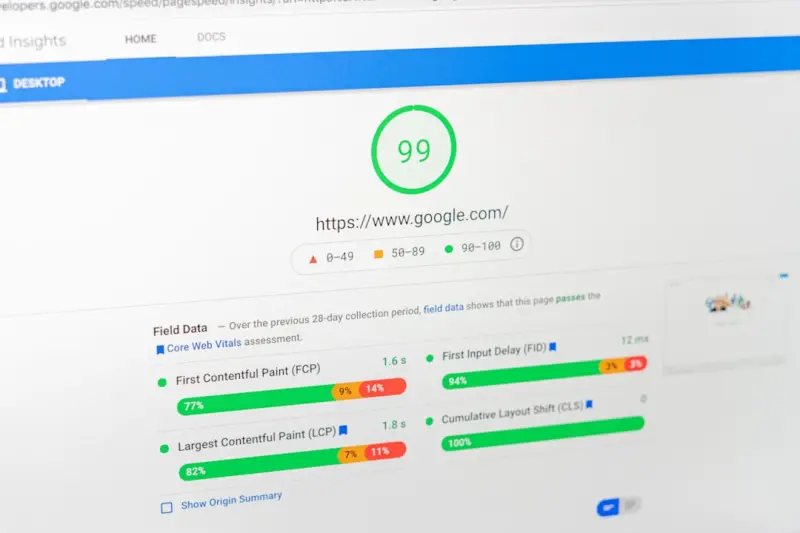
Why Core Web Vitals Are No Longer Optional for SaaS
When I first started tinkering with Google’s ranking factors, I treated Core Web Vitals (CWV) like a nice‑to‑have checklist item—something to fix after the “big” SEO levers were in place. Fast forward a few releases, and the reality is starkly different: Google now treats CWV as a gatekeeper for organic visibility. If your SaaS landing page lags on Largest Contentful Paint (LCP) or suffers from poor Interaction to Next Paint (INP), you’re essentially handing your competitors a free ticket to the top of the SERPs.
The Evolution from “Helpful Content” to “Speed‑First”
We’ve all read the Google Helpful Content Update analysis, which reminded us that relevance and expertise matter. What many marketers missed, however, is that relevance alone no longer guarantees a ranking. Google’s Page Experience signals, anchored by CWV, have been woven into the core algorithm, meaning the user’s first‑impression speed now directly influences perceived relevance.
Think of it this way: you can have the most brilliant SaaS solution on the planet, but if the sign‑up form takes three seconds to render, the user’s brain already tags the experience as “low quality.” The algorithm interprets that as a negative signal, and your content gets demoted—even if the same page scores perfectly on topical authority.
Breaking Down the Three Core Metrics
- Largest Contentful Paint (LCP) – Measures the time it takes for the largest visible element (often a hero image or headline) to appear. Ideal: < 2.5 seconds.
- First Input Delay (FID) / Interaction to Next Paint (INP) – Captures the delay between a user’s first interaction (click, tap) and the browser’s response. Ideal: < 100 ms for FID, < 200 ms for INP.
- Cumulative Layout Shift (CLS) – Quantifies visual stability; unexpected layout shifts frustrate users. Ideal: < 0.1.
While each metric stands on its own, together they form a holistic view of perceived performance. Google’s recent algorithmic refinements give each metric a weighted contribution to the overall page experience score, which is now a direct ranking factor for all queries, not just “mobile‑first” ones.
Why SaaS Companies Are Especially Vulnerable
SaaS sites typically juggle a lot of dynamic content: live dashboards, interactive product tours, and embedded video demos. All of these elements can inadvertently bloat page weight, inflate LCP, or cause layout shifts. Moreover, many SaaS marketing teams outsource their landing pages to product teams that prioritize feature depth over performance, inadvertently violating CWV best practices.
Unlike e‑commerce, where a single checkout page can be laser‑focused on speed, SaaS often spreads performance considerations across dozens of micro‑pages (pricing tables, case studies, API docs). That distribution makes it easy for a single lagging asset to drag down the entire domain’s perceived experience, causing a cascade effect on rankings across the site.
How Google’s Real‑Time Ranking Signals Interact with CWV
Google’s ranking engine is increasingly real‑time. When a user lands on a page, Google monitors the Core Web Vitals in the wild, feeding that data back into its ranking model. If a page consistently underperforms for a subset of users (say, those on slower 3G connections), the algorithm may downrank that page for similar queries.
This feedback loop is amplified by the next‑gen algorithms that prioritize “user satisfaction” over pure keyword relevance. In practice, a page that meets topical intent but delivers a sluggish experience will see a higher bounce rate, lower dwell time, and ultimately a lower rank.
Diagnosing CWV Issues on a SaaS Site
Before you can fix anything, you need data. The Chrome DevTools Performance panel, Lighthouse reports, and Google Search Console’s Core Web Vitals report are your first line of defense. Here’s a quick audit checklist:
- Identify high‑impact pages: Prioritize pages that drive the most traffic or conversions (e.g., free‑trial sign‑up, pricing, demo request).
- Measure LCP sources: Look for oversized hero images, unoptimized fonts, or render‑blocking scripts.
- Pinpoint FID/INP blockers: Long JavaScript tasks, third‑party widgets, or heavy React bundles.
- Detect CLS culprits: Ads that load asynchronously, dynamic content without size attributes, or font swaps.
- Cross‑device validation: Test on both high‑end and low‑end connections to ensure consistent performance.
Actionable Strategies to Boost Core Web Vitals
1. Adopt a “Performance‑First” Asset Pipeline
Integrate image compression (WebP, AVIF), font subsetting, and critical CSS extraction into your CI/CD pipeline. Tools like ImageOptim or Webpack’s Image Loader can automate these steps, guaranteeing that every new feature rollout respects the LCP budget.
2. Server‑Side Rendering (SSR) for Critical Paths
For React‑based SaaS dashboards, SSR can dramatically reduce the time to first meaningful paint. By rendering the initial view on the server, you hand the browser a pre‑populated HTML skeleton, slashing the amount of JavaScript the client must execute before displaying content.
3. Lazy‑Load Non‑Essential Resources
Defer loading of below‑the‑fold images, video thumbnails, and heavy third‑party scripts. Use the native loading="lazy" attribute for images, and the IntersectionObserver API for custom lazy‑loading logic.
4. Optimize Your Crawl Budget With Speed in Mind
A fast site not only pleases users but also signals to Google that your pages are worth crawling more frequently. For a deeper dive, see our guide on crawl budget optimization. When Google sees a site consistently delivering low‑LCP pages, it’s more likely to allocate additional crawl resources, creating a virtuous cycle of freshness and performance.
5. Reduce Layout Shifts With Predictive Space Allocation
Reserve explicit width and height attributes for all media elements. Use CSS aspect‑ratio boxes for dynamic content, and avoid inserting ads or pop‑ups that push content down after load. If you must serve dynamic components, consider skeleton screens that preserve layout stability.
6. Leverage a CDN with Edge‑Side Rendering
Content Delivery Networks (CDNs) can serve static assets from the edge, reducing latency. Some modern CDNs also support edge‑side rendering (ESR), allowing you to inject personalized content at the edge without sacrificing LCP.
Measuring Success: Beyond the Metrics
Improving CWV is not an end in itself; it’s a means to higher conversion rates and lower acquisition costs. Track the following KPIs after implementing performance upgrades:
- Conversion lift on high‑traffic pages (e.g., sign‑up form completion rate).
- Reduced bounce rate on blog posts and resource hubs.
- Lower average session duration for users who find what they need faster.
- Improved ad Quality Score if you run paid search campaigns—Google now incorporates page experience into ad rankings.
When you see a correlation between LCP improvements and a 5‑10% increase in MQLs, you’ll know the effort was worth it.
Future‑Proofing Your SaaS Site for Upcoming Google Signals
Google is already experimenting with user‑centric performance signals that go beyond the current CWV trio. Expect metrics that consider time to interactive under real‑world network conditions and perceived visual stability across device orientations. By adopting a performance‑first culture now, you’ll be positioned to adapt to those future signals with minimal friction.
In short, treat Core Web Vitals as a non‑negotiable foundation, not a nice‑to‑have afterthought. Align your development sprints, design system, and SEO strategy around speed and stability, and you’ll unlock a competitive edge that resonates both with users and Google’s ever‑evolving algorithmic lens.

Related Posts

Decoding Google’s Passage Ranking: A SaaS Playbook for Precise Visibility
Google’s new passage ranking lets a single paragraph outrank whole pages. This post shows SaaS mar... Read More

The Impact of Google Algorithms on Your Online Presence
Google algorithms play a crucial role in determining your online presence. Learn how to adapt your s... Read More

Passage Indexing & MUM: How Google’s Latest Algorithms Unlock SaaS Content Power
Google’s new Passage Indexing and MUM updates let SaaS sites rank specific sections and multimodal... Read More
Top Posts

Building a Sustainable Content Ecosystem: Turn One Idea into a Multi‑Channel Narrative
Turn one core insight into a dynamic network of assets across blogs, videos, social posts, and podcasts, creating a sustainable content ecosystem that fuels gro...Read More

The Everlasting Magic of Collectible Toys
Collectible toys have been a staple of childhood for generations, providing endless hours of entertainment, imagination, and joy. Learn about the everlasting ma...Read More

Why B2B SaaS Teams Need a Social Media Governance Framework (And How to Build One)
A practical guide for B2B SaaS marketers on establishing a social media governance framework that safeguards brand integrity, ensures compliance, and enables ag...Read More
LinkedIn SEO: Insider Tactics to Elevate Your Professional Visibility
Explore fresh LinkedIn SEO tactics—from keyword‑rich headlines to employee advocacy—that transform your profile into a search magnet and unlock new profes...Read More
0 Comments
Post Comment
You will need to Login or Register to comment on this post!