

Why Your SaaS Site Needs a Content Refresh Framework (and How to Build One)
When I first walked onto a SaaS product landing page that still used the same three‑sentence description from its launch day, I felt a pang of déjà vu. The tech world moves faster than a sprint‑cycle, yet so many sites cling to static copy, hoping Google will keep ranking it out of nostalgia. The reality? Stale on‑page assets are a silent traffic‑killer.
In this post I’ll walk you through a practical, data‑driven framework for identifying, prioritizing, and revamping existing pages so they stay aligned with search intent, user experience expectations, and the ever‑shifting SERP landscape. Think of it as a “content health check‑up” that you run every quarter, not a one‑off overhaul.
The Cost of Ignoring Content Decay
Every piece of content you publish has a lifecycle. At launch, it rides a wave of freshness, captures early keyword opportunities, and fuels inbound leads. Over time, three things happen:
- Search intent drifts. Users ask different questions, competitors publish newer resources, and Google’s algorithm adapts to surface the most relevant answer.
- User expectations evolve. Page speed, mobile ergonomics, and interactive cues become non‑negotiable. A page that once felt “fast enough” now lags behind the competition.
- Backlink profiles shift. New authoritative sites may link to related topics, while old links lose relevance or become broken.
If you don’t proactively address these changes, you’ll see a gradual dip in impressions, click‑through rates, and ultimately, conversions. The upside? A systematic refresh approach can reclaim lost rankings and even push you ahead of rivals who are still stuck in the past.
Step 1: Build a Content Inventory Dashboard
Start with a master spreadsheet (or a dedicated SEO tool) that captures every on‑page asset you own—landing pages, feature overviews, pricing tables, help‑center articles, and blog posts. For each entry, record the following metrics:
- URL
- Primary keyword(s) (the term you’re targeting)
- Current ranking position (average over the last 30 days)
- Organic traffic volume (monthly average)
- Engagement signals (bounce rate, time on page, conversion rate)
- Core Web Vitals score (LCP, FID, CLS)
- Last updated date
- Backlink count (from Ahrefs, Majestic, etc.)
Having this data in one view lets you spot the low‑performing pages that still attract backlinks or have high engagement—a clear sign they’re worth rescuing.
Step 2: Segment by Refresh Type
Not every page needs the same level of effort. I categorize them into three buckets:
- Quick Wins – Pages with decent traffic but sub‑optimal meta tags, missing alt text, or outdated statistics. A 30‑minute edit can bump rankings.
- Mid‑Level Overhauls – Pages that rank on the second page of results, have moderate traffic, but suffer from thin content or poor UX. These need a rewrite, better internal linking, and possibly added visual assets.
- Strategic Revamps – High‑value pages (e.g., pricing, feature comparison) that have slipped out of the top three positions. They demand a comprehensive update: new copy, schema, multimedia, and performance enhancements.
This segmentation ensures you allocate resources where the ROI is highest, rather than chasing vanity metrics.
Step 3: Align with Evolving Search Intent
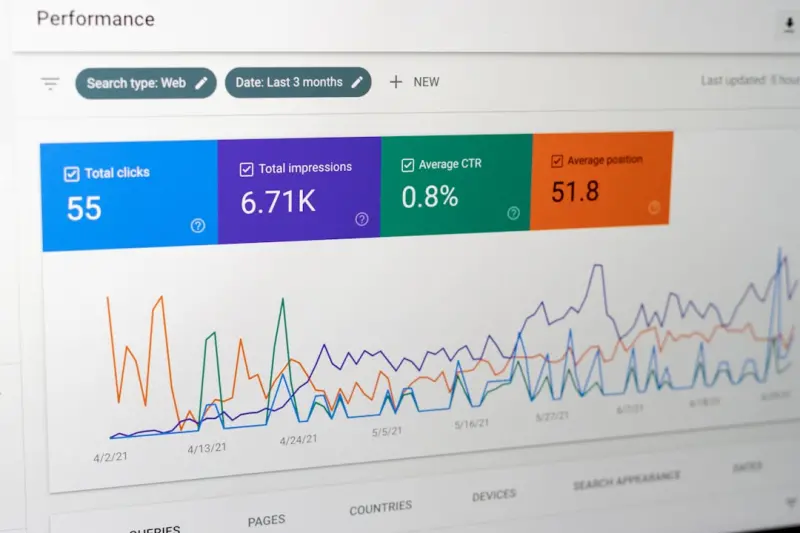
Search intent isn’t static. A keyword that once signaled “informational” can evolve into “transactional” as your market matures. Use tools like Google Search Console’s Performance report to see which queries are driving clicks and how users are engaging. Then ask:
- Is the page answering the current question?
- Are there new sub‑questions we can address?
- Do we need to pivot from a product‑centric tone to a problem‑solving narrative?
When you spot a mismatch, rewrite the copy to mirror the new intent. For instance, a page originally targeting “SaaS analytics” might now benefit from a focus on “real‑time usage dashboards for remote teams.”
Step 4: Supercharge the User Experience
Google’s ranking factors have increasingly emphasized real‑world UX signals. Here’s a quick checklist to future‑proof your pages:
- Page speed. Aim for a LCP under 2.5 seconds. Compress images, leverage lazy loading, and use a CDN.
- Mobile‑first design. Ensure tap targets are at least 48 dp and that text remains legible without zoom.
- Readability. Break up long paragraphs, use bullet points, and keep sentences under 20 words.
- Interactive elements. Consider embedding calculators, short demo videos, or a live chat widget to reduce bounce.
- Accessibility. Include descriptive alt attributes, ARIA labels, and ensure contrast ratios meet WCAG AA.
These tweaks not only please Google’s algorithms but also keep prospects engaged long enough to convert.
Step 5: Reinforce Semantic Context
While you’re refreshing content, double‑down on semantic relevance. A well‑structured smart linking strategy can signal to search engines how your pages relate to each other. Here’s how:
- Identify core “pillar” topics (e.g., “customer onboarding” or “subscription management”).
- Link from detailed sub‑pages back to the pillar using descriptive anchor text that reflects the target keyword.
- Conversely, embed contextual links from the pillar to the sub‑pages, creating a two‑way flow of authority.
When you map this network, you’ll notice clusters of pages supporting each other, boosting the topical authority of the whole suite.
Step 6: Leverage Structured Enhancements (Without Over‑Engineering)
Schema markup can give your refreshed pages a visual edge in SERPs—think FAQ boxes, star ratings, or product snippets. However, avoid the temptation to over‑load every page with every possible type. Focus on the markup that aligns with user intent:
- FAQ schema for support‑center articles.
- Product schema for pricing and feature pages.
- Review schema where you showcase customer testimonials.
Implementing the right markup can increase click‑through rates by up to 30 % in some cases, without requiring a full redesign.
Step 7: Create a Refresh Calendar and Governance Model
To keep the process sustainable, embed it into your editorial workflow:
- Quarterly audit. Run the inventory dashboard, flag pages that have crossed the “stale” threshold (e.g., not updated in 12 months).
- Assign owners. Each content piece should have a responsible team member—product manager, marketer, or SEO specialist.
- Set deadlines. Prioritize Quick Wins first, then schedule Mid‑Level Overhauls for the following month, and allocate a sprint for Strategic Revamps.
- Track results. Post‑refresh, monitor ranking, traffic, and conversion changes for at least 45 days to gauge impact.
When you pair this calendar with a clear governance model, you eliminate the “who‑does‑what” bottleneck that often stalls SEO initiatives.
Case Study: Turning a Stagnant Feature Page into a Conversion Magnet
One of my SaaS clients had a “API Documentation” page that once ranked #5 for “SaaS API guide.” Over six months, it slipped to #12, and organic leads from that page dropped 40 %.
We applied the refresh framework:
- Data audit: Identified low Core Web Vitals scores and a lack of visual examples.
- Intent shift: Users were now searching “how to integrate API with Zapier,” not just “API guide.”
- UX upgrades: Added interactive code snippets, a short explainer video, and optimized images.
- Semantic linking: Linked the page to a new “Automation Use Cases” pillar, using descriptive anchor text.
- Schema: Implemented FAQ markup for common integration questions.
Result? Within eight weeks, the page climbed back to #4, organic sessions rose 55 %, and the lead‑to‑MQL conversion rate increased by 22 %.
Tools That Make Refreshes Faster
While you can manually compile the inventory, these tools shave hours off the process:
- Google Search Console. Pull performance data and identify queries with high impressions but low CTR.
- Screaming Frog. Crawl your site for missing meta tags, broken links, and page speed issues.
- Ahrefs Content Gap. Spot topics your competitors rank for that you don’t.
- Google PageSpeed Insights API. Automate Core Web Vitals reporting.
Integrate the output into a shared Google Sheet or a project‑management board, and you’ll have a living roadmap for content health.
Measuring Success: Beyond Rankings
Rankings are a useful indicator, but the ultimate KPI for SaaS is qualified pipeline contribution. After each refresh cycle, compare:
- Organic MQLs. New leads directly attributable to organic traffic.
- Conversion paths. How many users travel from the refreshed page to a demo request or trial sign‑up.
- Engagement depth. Average pages per session and session duration.
If you see improvements in these metrics, your refresh framework is delivering real business value.
Putting It All Together: The 5‑Step Refresh Loop
To keep it top‑of‑mind, here’s a concise loop you can embed in any SaaS marketing playbook:
- Audit. Run the inventory dashboard quarterly.
- Prioritize. Segment pages into Quick Wins, Mid‑Level Overhauls, and Strategic Revamps.
- Update. Align copy with current intent, boost UX, and add targeted schema.
- Link. Strengthen internal connections using a semantic approach.
- Analyze. Track ranking, traffic, and conversion uplift for each refreshed page.
This loop creates a self‑reinforcing cycle: each refresh improves authority, which fuels higher rankings, which in turn attract more links and engagement—making the next refresh even easier.
Final Thoughts
On‑page SEO isn’t a set‑and‑forget checkbox. It’s a living, breathing discipline that must evolve with your product, your audience, and the search ecosystem. By treating your existing content as a strategic asset—one that you regularly diagnose, treat, and re‑optimize—you’ll turn what could be an SEO liability into a sustainable growth engine.
Ready to get started? Grab your data, map out the refresh calendar, and watch those stagnant pages come back to life.

Related Posts
Structured Data Secrets: Boosting On‑Page SEO for SaaS Products
Learn how to use schema markup to turn ordinary SaaS pages into rich search results, improve clickâ€... Read More

Mastering On‑Page SEO with Semantic Structure and Entity Optimization
Learn a fresh on‑page SEO strategy that blends semantic markup, entity‑driven content, and perfo... Read More

The Psychology Behind High‑Impact On‑Page SEO
Learn to align on‑page SEO with human psychology—using attention patterns, cognitive biases, and... Read More
Top Posts

Turning WordPress Into a Voice‑Search Powerhouse
A step‑by‑step guide that shows WordPress owners how to capture voice‑search traffic through conversational keyword research, schema markup, Gutenberg blo...Read More

Beyond Speed: Harnessing Core Web Vitals and Structured Data for On‑Page SEO Success
This post reveals a step‑by‑step framework for auditing, optimizing, and automating Core Web Vitals alongside structured data, giving SaaS pages the perform...Read More

Zero‑Click SEO: Turning SERP Snippets into Traffic Magnets
A practical guide to mastering zero‑click SEO, from rich snippets to knowledge panels, showing SaaS marketers how to capture audience attention directly on th...Read More

Multi‑Channel Content Repurposing Blueprint
Learn how to turn one core idea into a suite of formats—articles, reels, podcasts, and more—using a structured workflow that saves time, expands audience, a...Read More
0 Comments
Post Comment
You will need to Login or Register to comment on this post!