

Why WordPress Site Architecture Is the Hidden Engine Behind Rankings
When I first migrated a client’s blog from a static HTML site to WordPress, the traffic surge wasn’t the result of a new theme or a handful of plugins—it was the subtle, yet powerful, re‑organization of the site’s architecture that opened the doors for search engines. Site architecture acts as the roadmap that guides crawlers through your content, and in the WordPress ecosystem, every taxonomy, menu, and URL can either illuminate that path or obscure it behind a maze of orphaned pages. Over the years I’ve watched the same handful of principles repeatedly prove their worth: logical hierarchies, deliberate internal linking, and a clear, crawl‑friendly URL structure—all of which can be implemented without writing a single line of code, thanks to WordPress’s built‑in flexibility.
Crafting Content Silos That Speak the Language of Search Engines
The concept of a content silo is simple on paper—group related topics under a single thematic umbrella so both users and bots understand the topical relevance of each page—but executing it in WordPress requires a strategic blend of categories, tags, and custom taxonomies. Think of each silo as a mini‑site within your larger domain; it should have a pillar page that introduces the core theme, followed by supporting articles that dive deeper, each linking back to the pillar and to one another in a natural hierarchy. By aligning your silos with the way Google interprets topical authority, you give your site a structural advantage that goes far beyond keyword stuffing, allowing the algorithm to see the breadth and depth of your expertise at a glance.
Designing Your Silos: Categories, Tags, and Custom Taxonomies
Start by mapping out the main themes you want to dominate—say, “WordPress Performance,” “SEO Plugins,” and “Content Strategy”—and assign each a top‑level category that will become the anchor of its silo. Use tags sparingly, reserving them for sub‑topics that cut across multiple silos; too many tags dilute relevance and create thin, low‑value pages. For more granular control, consider creating custom taxonomies such as “Optimization Technique” or “Audience Segment,” which let you layer additional context without overloading the default category system. In practice, this means a post about “Caching with WP Rocket” lives under the “WordPress Performance” category, tagged with “caching,” while a guide on “Keyword Research for Blog Posts” sits in “Content Strategy” with a tag of “keyword research.” This disciplined taxonomy setup ensures that each piece of content reinforces its parent silo, sending clear signals to crawlers about the site’s thematic architecture.
Navigation Menus and Breadcrumbs: The User‑Facing Silos
Even the most meticulously planned taxonomy will fall flat if the front‑end navigation doesn’t echo the underlying structure, which is why WordPress menus and breadcrumbs are essential tools for reinforcing silos. Build a primary menu that mirrors your top‑level categories, and use dropdowns to expose the most important sub‑pages—this not only improves user experience but also creates additional internal links that solidify the silo hierarchy. Breadcrumb plugins, such as Yoast SEO or Rank Math, automatically generate a trail like Home → WordPress Performance → Caching, providing both a visual cue for visitors and a crawlable pathway for bots. When configured correctly, every click from the homepage to a deep‑dive article passes through the pillar page, strengthening the thematic relevance of the entire silo in the eyes of search engines.
Strategic Internal Linking: Turning Every Link into an SEO Vote
Internal linking is the glue that binds your silos together, and WordPress makes it effortless to embed contextual links directly within the content editor. As you write, consciously link back to the pillar page of the silo, and sprinkle in links to related supporting articles—this creates a dense web of relevance that search engines love. For added authority, use descriptive anchor text that reflects the target page’s focus, avoiding generic phrases like “click here.” When you need inspiration, the semantic SEO guide offers a solid reminder of how structured data can amplify the value of those internal links, while the Zero‑Click Search Optimization article illustrates why making your links visible in SERPs matters more than ever.
Permalink Patterns That Mirror Your Silo Structure
A clean permalink structure not only looks professional—it also tells search engines exactly where a page belongs within your hierarchy. In WordPress, set your permalinks to “/%category%/%postname%/” so that URLs automatically inherit the category slug, turning a link like example.com/wordpress-performance/caching-with-wp-rocket/ into a clear, keyword‑rich path that reinforces the silo theme. For deeper levels, consider nesting categories, such as “/wordpress-performance/caching/,” which adds an extra layer of specificity without overcomplicating the URL. Remember to redirect any old URLs with 301 redirects to preserve link equity, and use a plugin like Redirection to manage these changes seamlessly. By aligning your URLs with the silo taxonomy, you create a harmonious ecosystem where every breadcrumb, menu item, and link tells the same story of topical authority.
Scaling Authority with WordPress Multisite and Sub‑domains
For larger brands or agencies managing multiple niche sites, WordPress Multisite offers a powerful way to distribute authority across a network while preserving the benefits of siloed architecture. Each sub‑site can serve as a dedicated authority hub for a specific keyword cluster—think “WordPress SEO” on one site and “E‑commerce Optimization” on another—while sharing a common user base and cross‑linking strategy that amplifies overall domain strength. By using sub‑domains (e.g., seo.example.com) or sub‑directories (e.g., example.com/seo/), you retain the flexibility to experiment with different silo structures without diluting the core site’s focus. This approach also simplifies content governance, allowing you to assign editors to individual silos, enforce consistent SEO guidelines, and monitor performance at both the site and network level.
Measuring Success and Iterating on Your Architecture
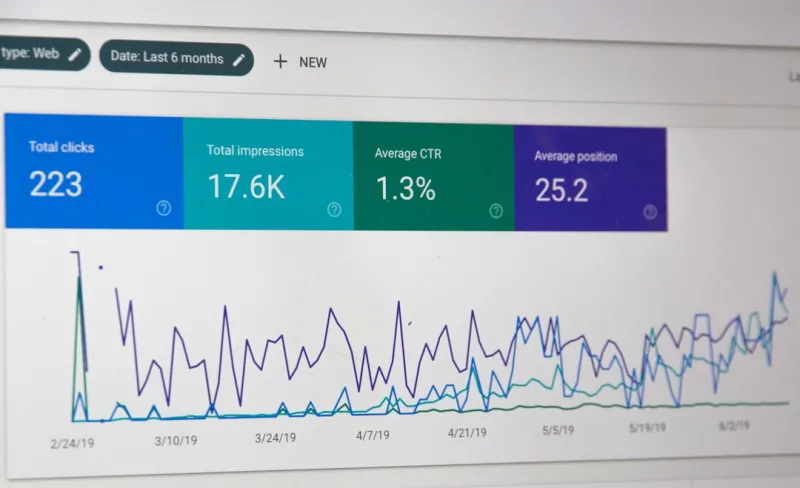
The final piece of the puzzle is a data‑driven feedback loop that tells you whether your silos are delivering the expected SEO lift. Use Google Search Console to track impressions and clicks for each pillar page, and watch for any unexpected drop‑offs that might signal orphaned content or broken internal links. Heat‑map tools can reveal how users navigate through your menus and breadcrumbs, highlighting opportunities to streamline pathways or add missing cross‑links. Regularly audit your site with crawling tools like Screaming Frog to catch thin silos, duplicate content, or crawl errors that could undermine your architecture. By treating site architecture as a living, evolving system—rather than a set‑and‑forget configuration—you ensure that your WordPress site remains a robust, authority‑building machine in the ever‑changing SEO landscape.

Related Posts

Unlocking the Hidden SEO Power of WordPress Taxonomies
A deep dive into WordPress site architecture—covering permalinks, custom taxonomies, CPTs, interna... Read More

Unlocking WordPress SEO: A Human‑Centric Playbook for Modern Marketers
Discover a human‑centric WordPress SEO roadmap that blends technical mastery, compelling storytell... Read More

Turning WordPress Custom Types into SEO Engines
Learn how to leverage WordPress custom post types, targeted taxonomies, and API‑driven audits to b... Read More
Top Posts

Cracking Google’s MUM: A SaaS Marketer’s Survival Guide
This guide breaks down Google’s MUM algorithm for SaaS marketers, offering practical steps to build multimodal content hubs, leverage structured data, and mea...Read More
Technical SEO in the Age of AI: Strategies to Stay Ahead
Discover the latest technical SEO strategies for the age of AI. Learn how to optimize for voice search, prioritize accessibility, and improve website performanc...Read More

From Ideas to Impact: Crafting a Content Strategy That Resonates
A holistic content strategy turns scattered pieces into a cohesive experience, aligning audience insight, storytelling frameworks, and measurable goals to drive...Read More

Trending Content Creation Strategies for 2024: Rose DesRochers' Insightful Guide
Rose DesRochers reveals the 2024 content creation playbook, merging human‑centric storytelling with data, tech, and authentic trends for lasting brand impact....Read More
0 Comments
Post Comment
You will need to Login or Register to comment on this post!