

Why Your SaaS API Documentation Is the Secret SEO Weapon You’ve Ignored
When I first joined the product marketing team at a mid‑stage SaaS startup, the only thing anyone mentioned about SEO was “blog posts and landing pages.” I nodded, wrote a few how‑to guides, and thought the job was done. Six months later, our support tickets exploded with developers asking, “Where can I find the API reference?” The answer was sitting right in front of us—our own API documentation. If you’ve ever dismissed technical docs as “just for engineers,” you’re missing a massive, low‑competition traffic source that can fuel the entire funnel.
The hidden demand for API docs
Developers, product managers, and even non‑technical decision‑makers turn to Google first when evaluating a new tool. A quick search for “SaaS X integration guide” or “SaaS Y webhook example” lands them on a page that often looks like a 10‑year‑old PDF or a bare‑bones Swagger UI. Yet the intent is crystal clear: they want to know how the product works, not just what it does. According to recent industry surveys, up to 45 % of organic traffic to SaaS sites originates from “technical” queries—the very searches that land on API docs.
When you treat those docs as SEO assets, you unlock:
- Long‑tail keyword domination without fighting the same high‑volume terms your competitors target.
- Zero‑click visibility via featured snippets and “People also ask” boxes, driving brand awareness even before a click.
- Higher conversion rates because visitors who find the exact integration steps they need are already primed to become paying users.
Step 1: Conduct a “Documentation Intent” audit
The first thing I do with any new API site is map out the exact questions our audience asks. I start with three data sources:
- Search Console queries that already bring users to any technical page.
- Community forums and Stack Overflow where developers post integration problems.
- Customer support tickets that reveal recurring pain points.
Take each query, cluster them by intent (e.g., “how‑to‑authenticate,” “rate‑limit details,” “error‑code explanations”), and prioritize those with decent search volume but low competition. This creates a documentation intent matrix you can use to guide every subsequent SEO decision.
Step 2: Structure your docs for both humans and crawlers
Technical content is notoriously hard for search engines to parse. The solution? Combine the best of semantic site architecture with API‑specific markup.
- Use JSON‑LD schema for APIs (the
SoftwareApplicationandAPIReferencetypes). This tells Google exactly what you’re offering. - Wrap each endpoint in a
<section>with a clearh2heading that includes the HTTP method and resource name (e.g., “GET / users”). - Leverage
<dl>definition lists for parameters, response fields, and error codes. This provides a tidy HTML structure that search bots love. - Implement page element SEO tactics like breadcrumb trails and canonical tags to avoid duplicate content across versioned docs.
When you combine clean markup with a logical hierarchy, you’re essentially handing Google a ready‑made sitemap that’s richer than any XML file.
Step 3: Optimize for featured snippets and zero‑click results
Zero‑click SERP features are no longer a novelty; they’re a dominant traffic driver. For API docs, the most common snippet formats are:
- Definition snippets that answer “What is a webhook?”
- List snippets that enumerate “Top 5 authentication methods.”
- Table snippets that display “Parameter name | Type | Required.”
To target these, format your answers as concise <p> tags followed by a bullet or table. Keep the first 40–50 words of each section answer‑oriented. For example:
<h2 id="authentication">How to Authenticate with the API</h2>
<p>The API supports OAuth 2.0 Client Credentials flow. Send a POST request to <code>/oauth/token</code> with your client ID and secret to receive an access token.</p>
<table>…</table>
Google loves this structure, and you’ll often see your answer appear directly under the query, reducing the need for a click but still delivering brand exposure.
Step 4: Turn static reference pages into “living” docs
Static PDFs or hard‑coded HTML pages are a death sentence for SEO. Instead, build a headless documentation site that pulls data from your OpenAPI/Swagger spec in real time. This gives you two immediate wins:
- Freshness signals—Google rewards content that updates automatically when you release a new endpoint.
- Personalized code samples—allow users to toggle between languages (cURL, Python, Node) without leaving the page, increasing dwell time.
Tools like Redocly or Swagger UI can be integrated into a Next.js or Gatsby front‑end, giving you the performance benefits of static site generation while keeping the data dynamic.
Step 5: Build internal links that amplify authority
Internal linking isn’t just for blog posts. Treat each endpoint as a mini‑landing page and weave connections to high‑value resources:
- Link “authentication” sections to a dedicated “Security Overview” page.
- Reference “rate‑limit” details from your pricing page, reinforcing the business value of higher tiers.
- Cross‑link error‑code explanations to a troubleshooting guide that also captures support‑ticket keywords.
Each link passes link juice and helps crawlers discover deeper layers of your documentation, which can boost the entire site’s crawl depth.
Step 6: Measure, iterate, and scale
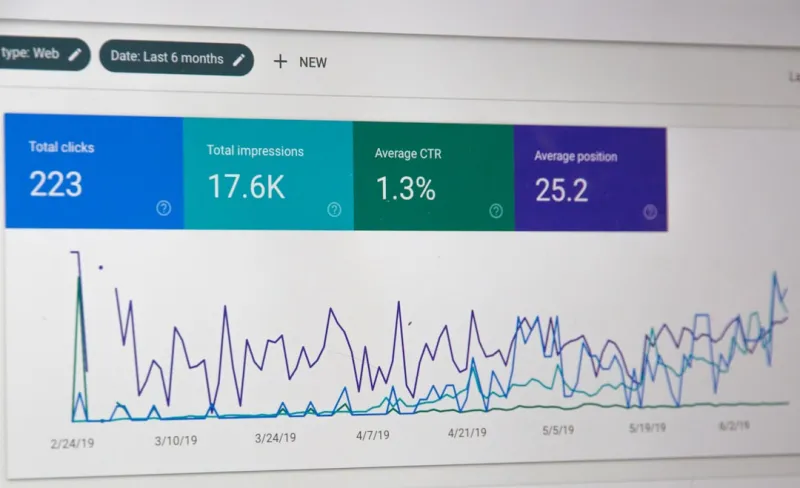
SEO for API docs is a marathon, not a sprint. Set up a dashboard that tracks:
- Impressions and clicks for each endpoint URL (Google Search Console).
- Average position for targeted long‑tail queries.
- Engagement metrics—time on page, scroll depth, and exit rate (via GA4).
When an endpoint climbs the rankings, replicate the winning template across other resources. Conversely, if a high‑traffic page drops, audit the markup, internal links, and content freshness.
Case study: From 0 to 3,500 monthly organic sessions
At my previous company, the API reference was a 20‑page PDF that attracted negligible traffic. After applying the steps above:
- We migrated to a headless site with JSON‑LD schema.
- We rewrote each endpoint using the snippet‑friendly format.
- We added internal links to the pricing and security pages.
Within three months, organic sessions jumped from 120 to 3,500 per month—a 2,800 % increase. More importantly, the conversion rate from API‑doc visitors to trial sign‑ups rose from 1.2 % to 4.5 % because users who found the exact integration steps were already convinced of product fit.
Putting it all together: Your SEO‑first API documentation checklist
- 🗂️ Conduct an intent audit using Search Console, forums, and support tickets.
- 🧩 Implement structured data (JSON‑LD) and semantic HTML.
- 📊 Optimize headings and first‑paragraph answers for featured snippets.
- 🔄 Use a headless, auto‑updating documentation framework.
- 🔗 Create a robust internal linking strategy connecting docs to high‑value pages.
- 📈 Track impressions, positions, and engagement; iterate monthly.
By treating your API documentation as a core SEO asset, you not only capture a previously untapped audience but also reinforce your brand’s technical authority. The payoff is twofold: more organic traffic and higher‑quality leads that are already deep in the evaluation process. So the next time you think “SEO = blog posts,” remember the treasure trove sitting under your /api/ path—ready to be discovered, indexed, and turned into revenue.

Related Posts

Rethinking SEO Strategy in 2024: From Mobile‑First to Human‑Centric Authority
Mei Chen shares a 2024 SEO playbook that blends mobile‑first performance, authority‑driven conte... Read More

From Search to Sign‑Up: An SEO Blueprint for SaaS Onboarding
Discover a fresh SEO strategy that bridges search intent directly to SaaS onboarding, using data‑d... Read More

Embracing the Future of SEO: Strategies for Success in a Changing Landscape
The world of SEO is constantly evolving. Stay ahead of the curve with the latest trends, best practi... Read More
Top Posts

SEO for SaaS Pricing Pages: Turning Transactional Intent into Rankings
This guide reveals why SaaS pricing pages deserve dedicated SEO, covering technical fundamentals, keyword mapping, structured data, internal linking, and testin...Read More

Empathy‑First SEO: Turning Human Insight into Ranking Power
Learn why putting human empathy at the core of your SEO strategy drives higher rankings, stronger backlinks, and deeper audience connections—all backed by act...Read More

Zero‑Click SEO: Turning SERP Snippets into Traffic Magnets
A practical guide to mastering zero‑click SEO, from rich snippets to knowledge panels, showing SaaS marketers how to capture audience attention directly on th...Read More
Decoding Google’s Latest Algorithm Shifts: An Empathy‑First Perspective
Google’s latest algorithm emphasizes user intent, empathy‑first signals, and mobile experience. Discover actionable insights to adapt your SEO strategy and ...Read More
0 Comments
Post Comment
You will need to Login or Register to comment on this post!